Temperature and Thermal Throttling: Hidden Bottlenecks
Have you ever wondered why your computer slows down when it gets hot? When I first built my own PC and spent hours in gaming, I noticed strange slowdowns and frame drops, even though my setup was pretty powerful. I used to think my CPU or GPU was not strong enough. But later, I realized the real issue was not the hardware, infact, it was the heat.
You should remember that when your PC gets too hot, then it can not keep running at full speed. This is where temperature and thermal throttling come in, which quietly limit your performance without warning.
Thermal throttling is like invisible handbrakes that stop your CPU or GPU from running at their best when they overheat. It is a safety feature built into your system, but it can seriously hurt your FPS, multitasking, or even video rendering.
The worst part? Most people do not realize it is happening. In this guide, I will tell you what CPU thermal throttling really means, how it affects your CPU and GPU, and what you can do to reduce it.
Overview of Thermal Throttling
Thermal throttling happens when your computer’s parts, like the CPU or GPU, get too hot, so they slow down on purpose to protect themselves from damage. It is like your body slowing down when you get tired and overheated. Your computer does the same thing to stay safe.
When the temperature goes above a certain limit, then your system reduces the speed of your CPU or GPU. This means your computer will not perform as fast as it normally would. You might notice games lagging, apps opening slowly, or even freezing. It is not because your PC is broken, actually, it is just protecting itself.
Thermal throttling is helpful for safety, but it also becomes a hidden problem when it keeps happening, especially during gaming, video editing, or heavy tasks.
How High Temperatures Affect CPU/GPU Performance?
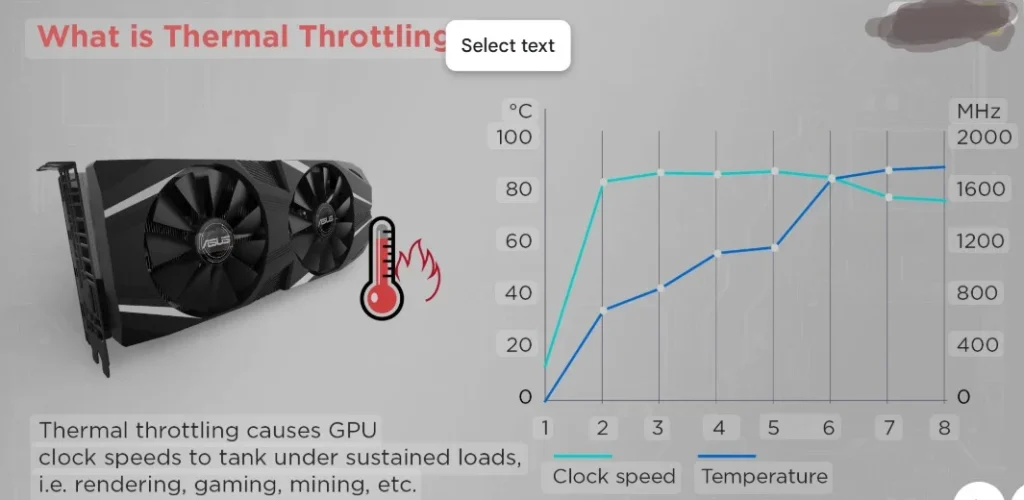
When your CPU or GPU gets too hot, it can not keep working at full power. If the temperature gets too high, then your PC will automatically lower its performance to avoid damage.
For example, if your CPU is supposed to run at 4.0 GHz, it might drop down to 3.0 GHz or even lower when it gets too hot. The same thing happens to your GPU, like the graphics might start system lag, overheating, frame rate drops, and your game feels choppy.
Over time, high heat can also shorten the life of your parts. So, keeping your system cool is not just about better performance, as it helps your computer last longer too.
The Hidden Bottleneck
Many users do not know about GPU thermal throttling until they face sudden slowdowns or lag. It acts as a hidden performance bottleneck, which quietly lowering performance when your PC gets too hot. Even with powerful CPUs and GPUs, your system can still slow down if cooling is not good enough.
You might notice:
- Sudden frame drops while gaming
- Random lag or stuttering during heavy tasks
- Slower CPU performance in editing or multitasking
- Overall system slowdown, even with high-end parts
It feels frustrating because the system is trying to protect your hardware, but at the same time, it stops you from getting full performance.
Which Situations Can Trigger Thermal Throttling?
Your PC’s CPU and GPU can start slowing down for many reasons, mostly because of heat. I will tell you some most common situations that can trigger thermal throttling:
- Heavy Gaming or Graphics Work
When you play high-end games or use software like video editors, then your GPU and CPU work very hard. This creates a lot of heat. If your cooling system is not strong enough, then the temperature rises fast, which leads to thermal throttling.
- Poor Airflow in the PC Case
If your PC case does not have good airflow, then the heat gets trapped inside. Even if your fans are working, they might not be enough to push out the hot air. This makes the whole system warm up quickly and throttle to protect itself.
- Using a Laptop on a Soft Surface
One of the main situations is placing your laptop on a bed, blanket, or pillow that blocks the vents underneath. This stops heat from escaping, which causes the internal parts to overheat. Laptops throttle faster than desktops because they have less space for cooling.
- Overclocking Without Proper Cooling
Overclocking pushes your CPU or GPU to run faster than normal. But if you do not have a strong cooling setup, then it will heat up fast. This often causes quick throttling because the parts can not handle the extra speed and heat.
- Dust Build-Up Inside the System
You should know that dust accumulation can block fans, vents, and heatsinks, which makes it harder for your PC to cool down. Even if the system is powerful, then dirty fans or clogged filters can raise temperatures and trigger throttling during basic tasks.
How to Avoid Thermal Throttling on Your CPU/GPU?
As you know that thermal throttling happens because your CPU or GPU gets too hot. The good news is that you can take simple steps to keep your PC cool and running smoothly. I will tell you how:
- Keep Your PC Clean and Dust-Free
You might not think about it much, but dust inside your PC can cause a big problem. It blocks the fans and vents that push hot air out. If you clean your PC every few months by blowing out dust with some compressed air or a soft brush, then you will help your system to stay cool and avoid slowdowns.
- Improve Airflow in Your PC Case
You have to make sure that your PC case has enough fans to push hot air out and bring cool air in. You should avoid blocking vents with cables or other objects. Because good airflow helps to lower the temperature quickly.
Personal Suggestions
My personal suggestion is that the most easiest way to avoid the frustration of hidden bottlenecks caused by temperature and thermal throttling is to pay attention to your PC cooling early. It is easy to ignore, especially when everything seems fine, but trust me, keeping your system clean, providing good airflow, and regularly checking your temperatures can save you a lot of headaches later.